Zend Framework Code Generator With Scaffolding – ZFcodo
Update: This project is now hosted at my GitHub account.
While I am a huge fan of Zend Framework, I miss having the code generation that is bundled with other frameworks I use. Since my favorite codegen/ORM is from the Qcubed project, I decided to take the Qcubed code generator and customize it for Zend Framework.
A little background on Qcubed: Qcubed is a framework branched off of the Qcodo project. Qcubed code generation connects to your already built database and generates your models, views, and controllers based on your database schema. Qcubed has a built-in ORM that uses the Active Record model and also a custom querying language similar to Doctrine ORM. (Go here for more information on the Qcubed project)
The advantage to using Qcubed over Doctrine is that I have it generating not only my models, but also basic forms, controllers, and views. I will also be running some benchmark tests because I think that out of the box, Qcubed ORM performs better than Doctrine. I have dubbed this project “ZFcodo”, which references the origins of the Qcubed project: Qcodo. So far I have a hacked together proof of concept that I think is interesting. Here is what I have with some example code so you can see why this will save you time setting up your Zend Framework Projects.
To get this going, I started with a basic Zend Framework application structure. Then I copied the entire Qcubed project into my custom library folder “ZFcodo”. I stripped out anything I could see from Qcubed that was specifically for the framework, and not related to the ORM or code generation and altered some files a little to match a Zend Framework application. I then created a ZFcodo manager file that would set all the constants needed and added the following to /application/configs/application.ini:
; ---
; Database and ZFcodo settings
; ---

zq.db.host = "localhost"
zq.db.username = "sample"
zq.db.password = "sample"
zq.db.name = "sample"

; ZFcodo Model Settins
zq.modelFolder = "/models"
zq.modelBaseFolder = "/Base"

; ZFcodo Form Settings
zq.generateForms = 0
zq.formFolder = "/forms"

; ZFcodo Controller Settings
zq.generateControllers = 0
zq.controllerFolder = "/controllers"
My next step was to add an init function to my /application/Bootstrap.php file that initialized the ZFcodo ORM:
protected function _initQcubed()
{
    require APPLICATION_PATH . '/../library/ZFcodo/Codegen/Manager.php';

    $zqConfig = $this->getOption('zq');
    $manager = new Zcodo_Manager($zqConfig);
    $manager->loadOrm();
}
And finally, I modified the Qcubed code generation PHP script to work from a CLI and put it into /application/scripts/zf-codo.php.
Now I can run zf-codo.php from the command line and it generates my models (including base models), basic controllers, basic views, and basic forms.
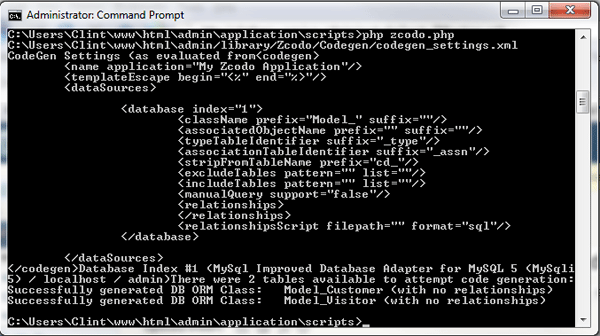
For my example, I created a simple “customer” table with “first name” and “last name”. The code generator added the following files for the table:
application/controllers/CustomerController.php
application/forms/Customer.php
application/models/Customer.php
application/models/Base/Customer.php
application/views/scripts/customer/list.phtml
application/views/scripts/customer/create.phtml
application/views/scripts/customer/edit.phtml
Then to list the customers, all I do is go to http://projectlocation/customer/list and I see this page:
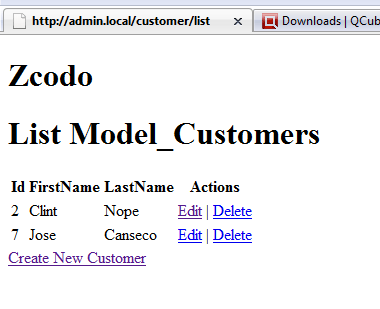
The codegen alone can get you off to a great start on your next ZF project, but with the built-in ORM, you can save hours on your project. ZFcodo will turn the 80/20 rule into the 90/10 rule… 
Right now this is more of a proof of concept (a nice way of saying it is a hack job) but I will continue to work on this, and if there seems to be a demand for this, I will work on it even more. I have implemented the ORM into a few live projects already and it seems to be working great.
You can get the entire project source code here: Zend Framework ORM
Update: This project is now hosted at my GitHub account
To use it, just edit the application.ini file with your database info, and then run the script application/scripts/zcodo.php from the CLI.
That easy…
The future plans for this project are to:
– organize the directory structure the Zend way
– add Zend_Paginator ability to the ORM
– style the generated forms
– and allow module based codegen
Let me know if you have any questions.